Send a one-color vector logo for custom leather menu covers, keep fine lines and tiny text out of it, and decide each placement before the mockup. Custom Leather Menu Covers reviews every file, returns a free mockup within 24 hours with unlimited revisions, and starts production only after you approve, so artwork problems are caught before any leather is pressed.
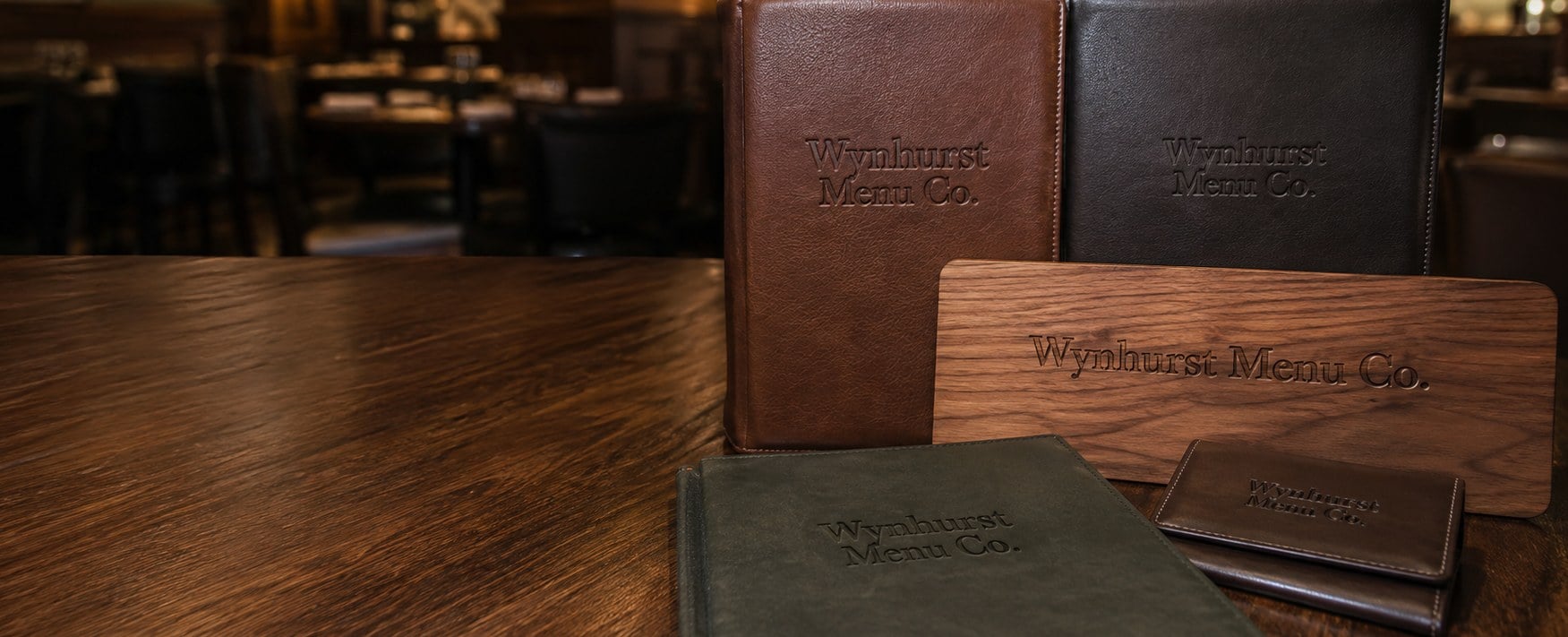
- Vector files (AI, EPS, SVG or vector PDF) make the cleanest logo die.
- Debossing and foil stamping press one color per impression.
- Front, spine, back and inside panels can each carry their own mark.
- Free mockup within 24 hours, unlimited revisions, minimum order of 12.
- Standard turnaround is about 2 weeks after mockup approval.
What logo file should you send for custom leather menu covers?
The best file for custom leather menu covers is a vector logo saved as AI, EPS, SVG or a vector PDF, because the metal die that presses your logo into the leather is made directly from clean outlines. A vector file keeps every curve and corner sharp no matter how large or small the logo is set on the cover.
If you only have a JPG or PNG, send it anyway. Custom Leather Menu Covers reviews every file before the mockup, and a clear, high-resolution image is often enough to show you the layout. The team will tell you if a file is too soft or too busy to press well, so nothing goes to production on a guess.
Helpful things to include with your file:
- The full logo and any simplified version or monogram your brand already uses.
- Your brand guide, if you have one, so foil and leather colors can be matched to it.
- A note on where the logo should sit: front center, lower corner, spine or inside panel.
- Any wording that must appear, such as the restaurant name, a tagline or the outlet name.
How does a logo change when it is debossed or foil-stamped into leather?
A logo on leather menu covers becomes a single-color, pressed shape. Debossing and foil stamping both use a heated die, so the cover shows one tone at a time: either the leather itself pressed deeper, or one foil color pressed in. Full-color artwork, gradients and photographic effects do not survive that process the way they do on paper.
That is why the artwork step matters more for leather menu covers than for printed menus. A logo that looks rich on a website may rely on shading, drop shadows or thin outlines that disappear once pressed into grain. The fix is not a redesign. It is usually a one-color version of the same mark, which most brand guides already include.
| Artwork feature | On leather menu covers | What to send instead |
|---|---|---|
| Gradients and shading | Flatten to one solid tone | A solid one-color version of the logo |
| Hairline strokes | Can fill in or break up in the grain | A version with slightly heavier lines |
| Very small text | Letters may close up | Drop the small line or set it larger |
| Multiple brand colors | One foil color per impression | Pick the color that leads the brand |
| Outlined or reversed shapes | Can read backward when pressed | Ask for both versions in the mockup |
Which logo details get lost on leather menu covers?
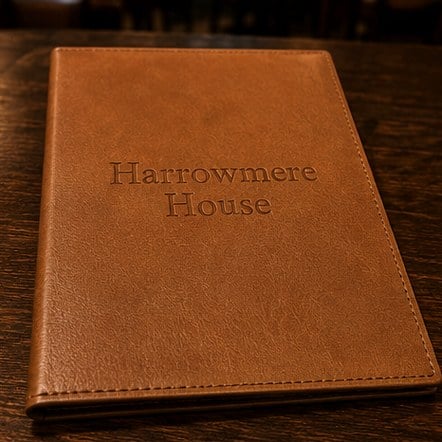
Fine detail is what gets lost on leather menu covers. Thin serifs, tiny registered marks, delicate script flourishes and small taglines under a main logo are the parts most likely to soften once pressed into leather, especially on pebbled or heavily textured grain. Smooth full-grain leather and smooth faux leather hold detail better than a deep pebble finish.
Script logos deserve extra attention. A handwritten restaurant name often has connecting strokes that thin out to almost nothing. On a printed menu that looks elegant, but in leather those hairlines can disappear and leave gaps in the word. Custom Leather Menu Covers will flag this in the mockup and suggest a slightly bolder stroke or a larger placement so the script stays readable.
A good test before you send artwork: shrink your logo on screen to about the size you picture on the cover, view it in a single dark color, and look at it from arm’s length. Anything you struggle to read there will struggle on the leather too. Removing that one fragile element usually improves the cover more than any change in finish or color.
Where can a logo go on a leather menu cover?
Most leather menu covers carry the logo on the front panel, either centered or set low in one corner. Those are the two placements guests notice first, and both work for debossing and foil stamping. Beyond the front, you can also brand the spine, the back panel or the inside of the cover, depending on the style you order.
Each placement is a separate impression, so plan your artwork for each one rather than reusing the full logo everywhere. A front logo can be the complete mark with the restaurant name. A spine works best with a short wordmark or monogram that fits a narrow strip. An inside panel suits a small secondary mark, a welcome line or the name of a specific dining room.
- Front center: the classic choice for fine dining and hotel restaurants.
- Front lower corner: quieter and more modern, good with a monogram.
- Spine: useful when menus are stacked or shelved at the host stand.
- Back panel: a small mark that finishes the cover when it is set face down.
- Inside panel: a discreet place for a tagline or outlet name.
Tell Custom Leather Menu Covers which placements you want before the mockup, and each one will be shown in position on your chosen cover style.
How do you choose foil and leather colors that match your brand?
Match leather menu cover colors to your brand by deciding which element carries the brand color: the leather or the foil. Leather comes in a set of tones such as black, brown, cognac, tan, burgundy, navy and gray, so the cover is usually chosen to suit the room, and the foil or a blind deboss carries the logo. Trying to force an exact brand color into the leather itself rarely helps.
Foil gives you more control over the logo color. Metallic gold, silver, copper and rose tones suit warm, low-lit rooms, while matte black or white foil reads as modern and graphic. If your brand guide lists a specific color, include it with your artwork so the closest available foil can be suggested and shown in the mockup.
Keep in mind that leather menu covers are viewed in your lighting, not on a bright monitor. A dark navy cover can read almost black in a dim dining room, and a soft gold foil can look brighter under spotlights. Ask for two or three color pairings in the mockup and judge them against your actual tables, chairs and hardware where you can. The leather vs. faux leather guide also explains how each material takes color.
What does the free mockup show, and what should you check before approving?
The free mockup for custom leather menu covers shows your logo placed on your chosen cover style, in your chosen leather and finish, at the size it will be pressed. Custom Leather Menu Covers sends it within 24 hours of your request, and revisions are unlimited and free, so you can adjust it until it looks right. You pay nothing until you approve the design.
Approval is the point where the die is made, so read the mockup the way a guest would see the finished cover. Check each item below before you say yes:
- Spelling: the restaurant name, outlet names and any tagline, letter by letter.
- Version: the current logo, not an older file someone had saved.
- Placement: front, spine, back and inside impressions exactly where you want them.
- Finish: blind deboss or the correct foil color on each placement.
- Cover: the right leather or faux leather, color, size and binding style.
- Quantities: the count for each style, starting from the minimum of 12.
If several people must sign off, such as an owner, a chef and a designer, share the mockup with all of them before approving. A change after the die is made costs time on the schedule, while a change at the mockup stage costs nothing.
What artwork mistakes slow down a leather menu cover order?
The most common delay on leather menu covers is late or changing artwork, not production. Standard turnaround is about 2 weeks after you approve the mockup, with faster turnaround available through express shipping, but that clock only starts once the design is final. Avoid these mistakes and your order moves on time:
- Sending a screenshot of the website logo. Screenshots are low resolution and often include background color. Send the original file from your designer or brand folder.
- Approving before the name is final. If the restaurant or outlet name might still change, wait. Pressed leather cannot be edited.
- Packing too much onto the front. A logo, tagline, address and website on one panel crowds the cover. Keep the front to the logo and name.
- Forgetting matching pieces. If wine lists and check presenters should match, send that artwork in the same request so the set is mocked up together.
- Mixing up placements across styles. When dinner, dessert and bar covers differ, label which artwork goes on which cover.
Each of these is easy to fix at the mockup stage, which is why Custom Leather Menu Covers reviews artwork before anything is made.
Do the menu inserts need artwork too?
Menu inserts need their own print-ready files, separate from the logo artwork for the leather menu covers. The cover logo is pressed with a die, while the inserts are printed pages with full color, your dishes and descriptions. Treat them as two jobs with two sets of files, even if you order them together.
For inserts, send a PDF of each page at the size of the cover’s panel or sleeve, with fonts embedded or outlined. If you are still writing the menu, you can approve the covers first and send insert files later, because the covers are built to hold your pages rather than the other way round. Custom Leather Menu Covers can print inserts in bulk too; the menu inserts and printing page covers paper stock and sizes, and the how it works page walks through ordering covers and inserts in one request.
Frequently asked questions
Can a QR code be debossed or foil-stamped on leather menu covers?
A QR code can be foil-stamped on leather menu covers, but scanning reliability depends on size, contrast and grain texture, so a blind deboss is rarely a good choice for codes. Smooth leather with a bright foil gives the best result. Custom Leather Menu Covers can show a QR placement in the free mockup, and many restaurants place the code on a printed insert instead.
Should a restaurant send a horizontal or stacked logo for leather menu covers?
Leather menu covers are taller than they are wide in most styles, so a stacked or square logo usually fills the front panel more naturally than a long horizontal lockup. A horizontal logo still works when set lower on the cover or along the spine. Send both versions if you have them and Custom Leather Menu Covers will show which reads better on your cover.
Can a different logo go on each panel of the same leather menu cover?
Leather menu covers can carry a different mark on the front, spine, back and inside, because each placement is pressed as its own impression. Many restaurants use the full logo on the front and a monogram on the spine or back. List each placement and its artwork when you request a mockup so every panel is shown in position before you approve.
Will a thin outlined logo look good on pebbled leather menu covers?
Thin outlined logos are risky on pebbled leather menu covers because the raised texture of the grain can break up fine lines once the logo is pressed. Smooth full-grain or smooth faux leather keeps outlines cleaner. If you love a pebbled finish, a filled or slightly heavier version of the logo is the safer choice, and the free mockup will show the difference.
Can my designer send artwork directly for our leather menu covers?
Your designer can send artwork for leather menu covers directly, and that often speeds things up because the original vector files come straight from the source. Include the restaurant name and contact person in the request so the files are matched to the right order. Custom Leather Menu Covers will send the free mockup to whoever you choose for review.
Can leather menu covers reproduce a two-color logo?
Leather menu covers press one color per impression, so a two-color logo is normally reduced to a single foil color or a blind deboss. Some brands keep the main shape in foil and let a secondary element sit as a blind deboss beside it. Custom Leather Menu Covers can mock up a one-color and a combined version so you can compare them on your own logo.
Does a dark logo on a dark leather menu cover still show?
A dark logo on a dark leather menu cover shows only as a pressed shape, because the same-tone finish is effectively a blind deboss. Black foil on black leather adds a slight sheen that is visible in good light but subtle in a dim room. For stronger contrast, Custom Leather Menu Covers usually suggests a metallic foil or a lighter leather color.
What happens if our logo file is too low resolution for leather menu covers?
A low-resolution logo file for leather menu covers is reviewed before the mockup, and you will be told if the edges are too soft to make a clean die. In that case the best step is asking your designer or printer for the original vector file. Custom Leather Menu Covers will not press artwork that would give a blurry or broken logo.
Can we approve the leather menu cover artwork before choosing the cover color?
Leather menu cover artwork and cover color are best approved together, because the same logo can look very different in gold foil on black leather and in a blind deboss on tan. Ask for two or three cover and finish pairings in your free mockup, which arrives within 24 hours. Revisions are unlimited, so narrowing the choice costs nothing before approval.
Should a restaurant add its address or website to leather menu covers?
Leather menu covers usually look best without an address or website, because small contact text crowds the panel and may not press cleanly. Guests already know where they are sitting, and contact details change more often than a logo. Custom Leather Menu Covers recommends putting that information on the printed inserts, where it can be updated without replacing any covers.
Can leather menu covers carry a tagline under the restaurant logo?
Leather menu covers can carry a short tagline under the logo when the words are large enough to press clearly. Long or very small taglines tend to fill in, especially on textured grain or in a blind deboss. If the tagline matters, Custom Leather Menu Covers can mock up the logo with and without it so you can see which version reads better.
Can we reorder leather menu covers later using the same artwork?
Leather menu covers can be reordered with the same approved artwork, which keeps new covers consistent with the ones already in the dining room. Keep a copy of the final mockup and mention it when you request the reorder, starting from the same minimum of 12. Custom Leather Menu Covers can confirm the leather, foil and placement match your earlier order.
Get a free mockup for your leather menu covers
Send your logo or idea and the quantity you have in mind. Custom Leather Menu Covers returns a free mockup within 24 hours, you approve the design before anything is produced, and standard turnaround is about two weeks with faster options available. Get a custom quote.